
Set up your Jump Tracker
Step 1: Connect your Jump Tracker to your device
Your Jump Tracker needs internet access to send your jump data. Select Configure Sensors to save your phone's hotspot details to both sensors.
Saved networks: Your Jump Tracker remembers up to five Wi-Fi networks. Repeat this step only when you want to add or change one.
You're finished when: Both sensor lights turn green or cyan.
Step 2: Setup your aiving account
Who are you?
Default is Skater. You can switch to Coach anytime.
1. Connect to the Aiving app
Pro tip: Bookmark the Aiving app and add it to your Home Screen.
2. Add your Jump Tracker to your account
- Open Aiving -> Jump Trackers and + Add new Jump Tracker.
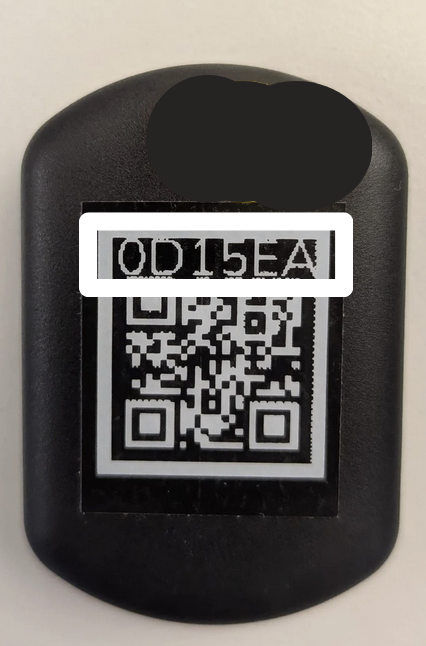
- Enter the right and left sensor IDs from the back of each sensor.
- Give your Jump Tracker a nickname.
Sensor ID location:
3. Invite skaters
- Open Aiving -> athlete page.
- To invite skaters, you have multiple options:
- Click Add skater and enter the skater's email. Existing users receive a request; new users receive an invitation to create an account.
- Click the invite link and share the QR code or email with the skaters.
Pro tip: You can also add a skater directly at the rink before starting a session.
3. Confirm your access4. Confirm your access
Make sure your subscription is liked to your account before your first session.
- Open Aiving -> Profile picture → Subscriptions.
- Under Manage my subscriptions, confirm you see your Jump Tracker plan.
- Check the assigned account — the skater slot should show the correct person (you, or the skater you want).
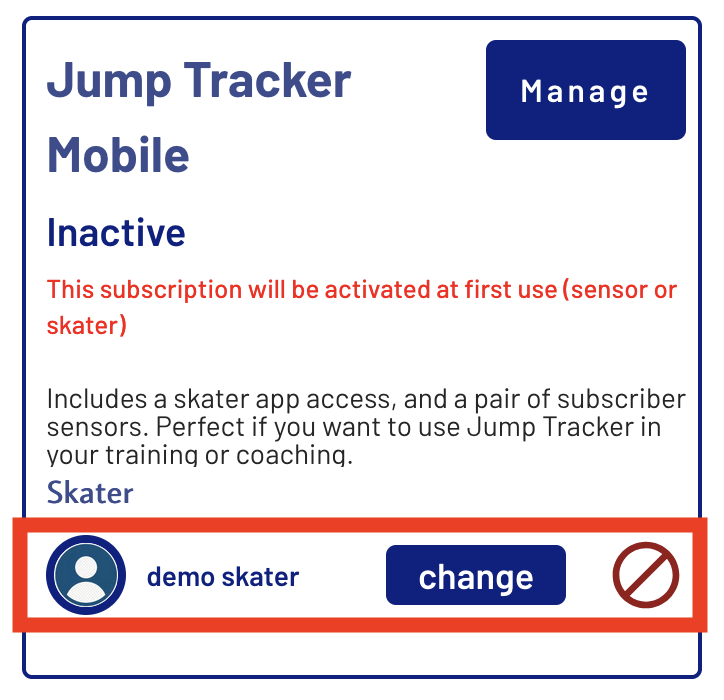
- When you are done, the skater should see Skater App Access in my subscription
I bought the subscription but don't see it
Check your order confirmation email — it contains a link to add the subscription to your Aiving account.
Still stuck? Contact us: WhatsApp or [email protected].
Step 1: Get to know the sensors and straps
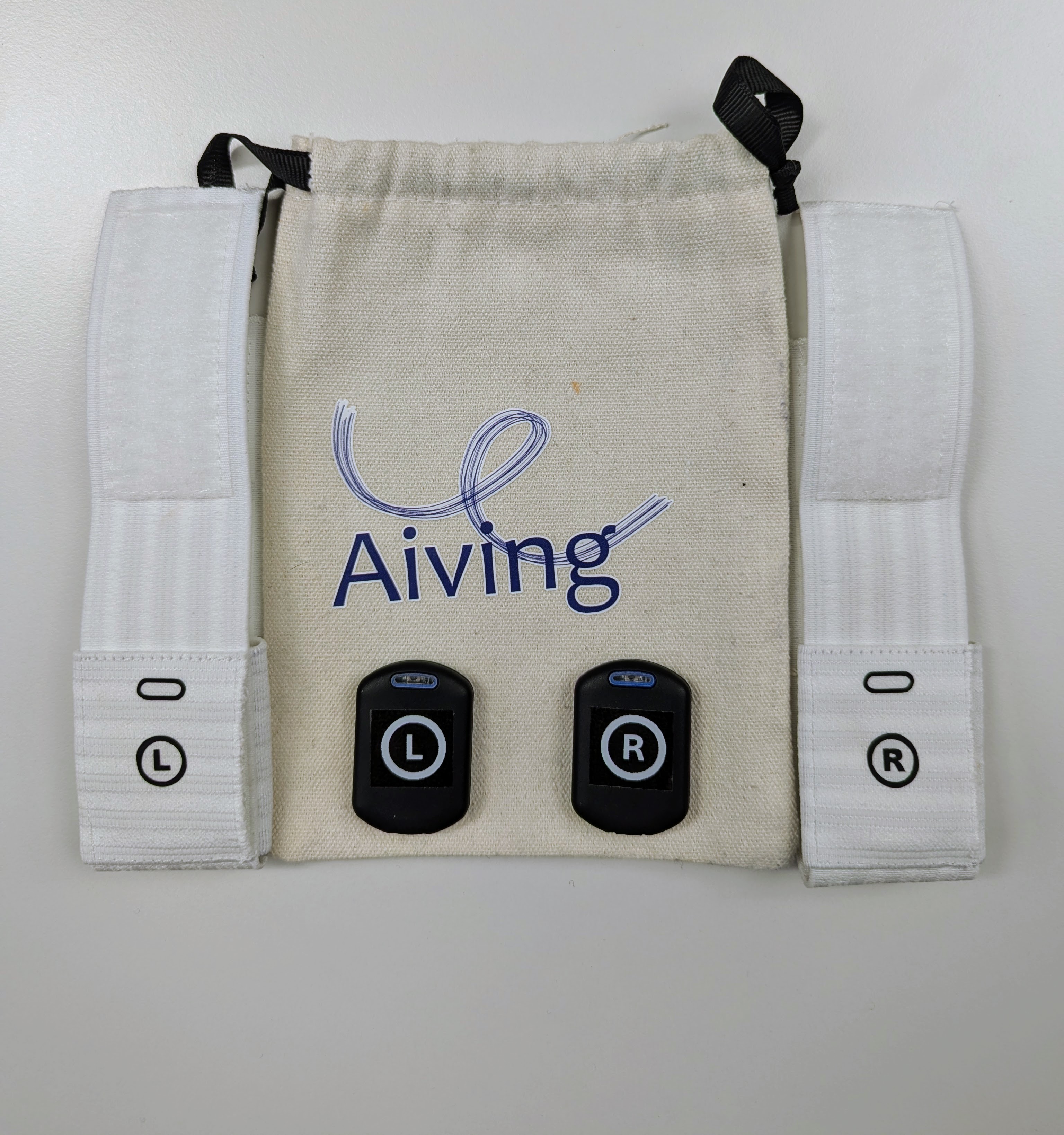
1. What's in the pouch?
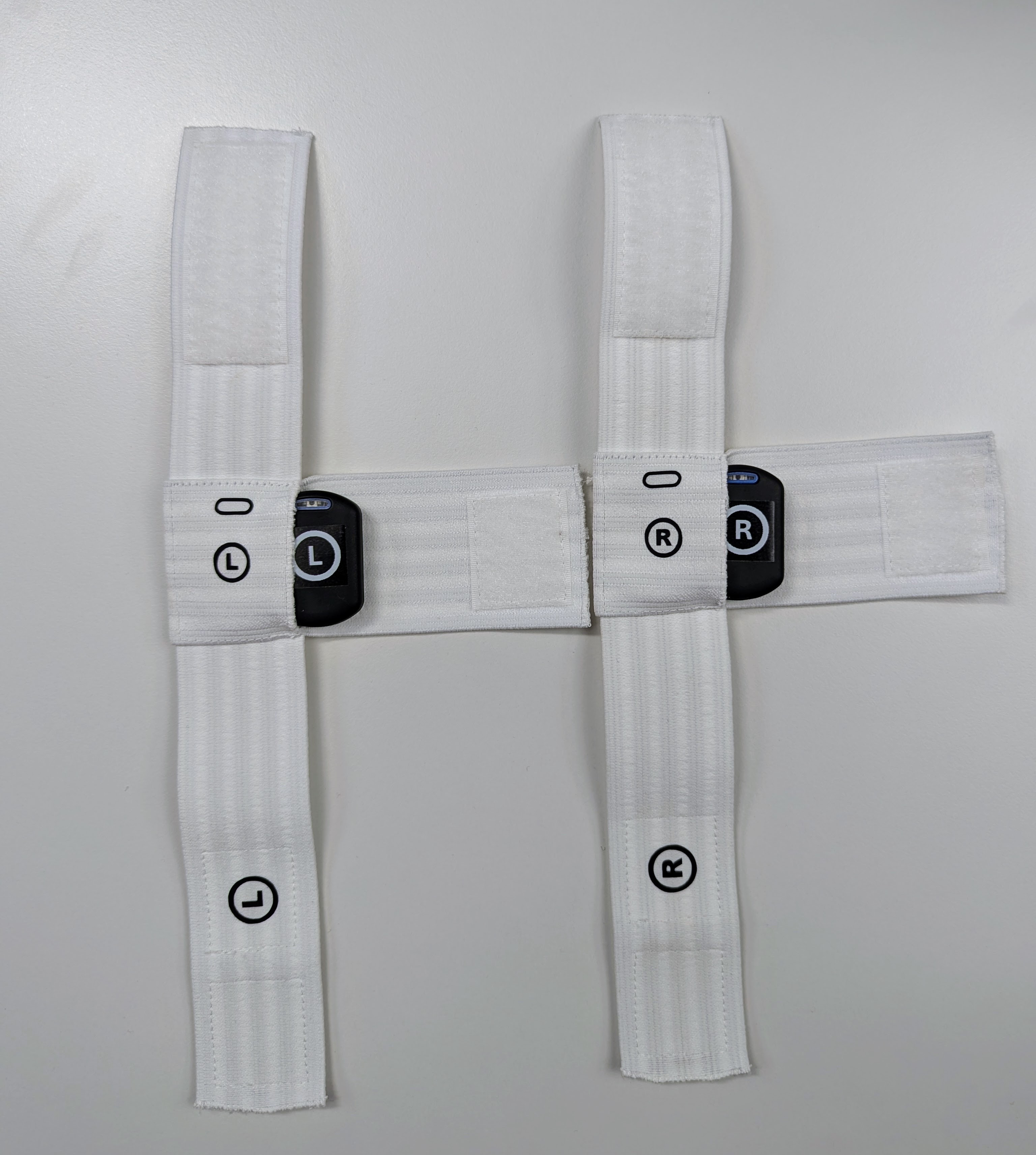
The sensors are inside the straps: remember how they were placed
It is important to place the sensors correctly in the straps.
2. Turning the sensors on/off
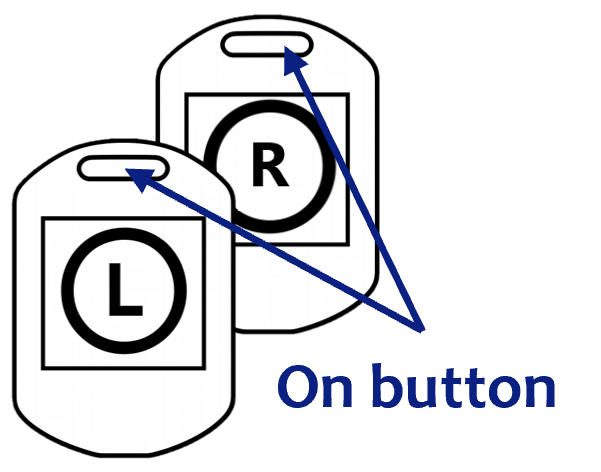
To turn on: press and hold the power button until the light turns on (white or slightly pink). ●
To turn off: press and hold the power button until the light blinks pink, then stops. ●
3. Check battery level
When the sensors are on, press the power button once and count the number of blue light blinks: it indicates the battery level.
● 1 = 0-25%● 2 = 25-50%● 3 = 50-75%● 4 = 75-100%
Red blinking indicates low battery ●
4. Charge your sensors
- Plug your sensors using the provided charger (USB-C).
- Turn sensors on.
- ● Blue light blinking - charging
- ● Blue light solid - fully charged, plugged in
- ● Other color - not plugged in
- 💡 Turn sensors off to charge faster.
Charging time: 5 hours from empty to full
Battery life: about 1 hour on ice.
5. Wear Jump Tracker on the ice
1. Place the sensors in the straps
- Place Right sensor in the Right strap aligning the button with the button slot (see image below)
- Repeat with Left sensor in Left strap
- You should see the sensor light shine through the button mark on your strap (if your strap is white)
- Close the straps and ensure sensors are securely in place.
2. Attach the straps to the skates
- The sensors go under the skates.
- The two arrows point toward you when attaching the straps to the skates.
- Straps are correctly placed if L and R are as shown on the image.
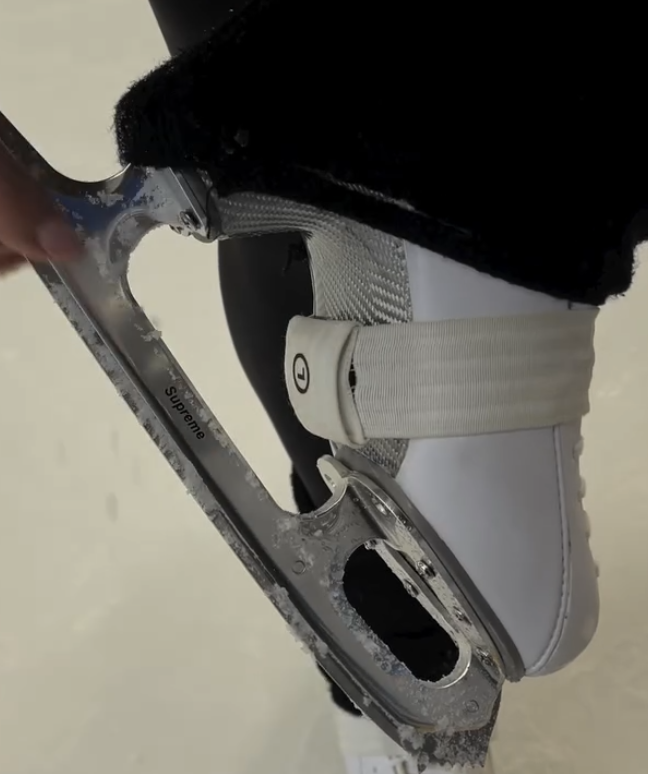
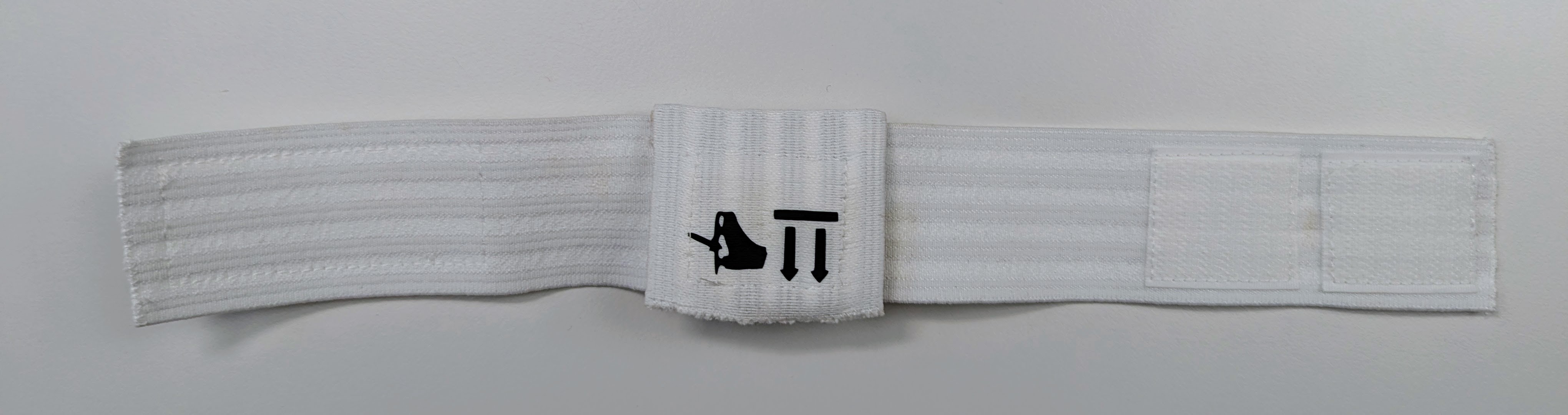
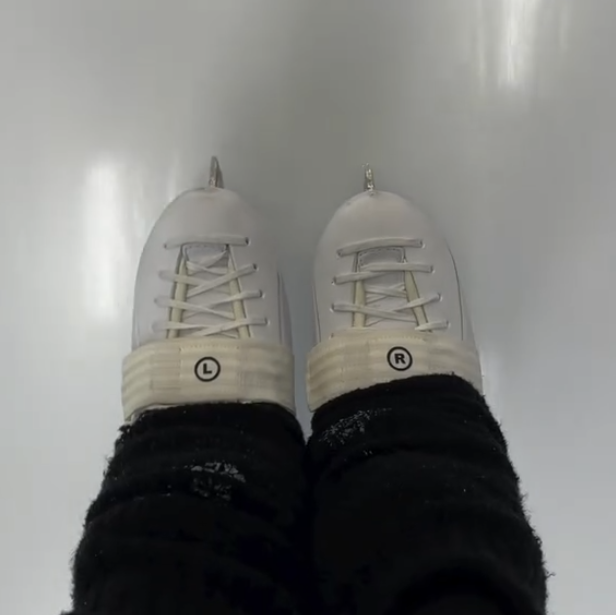
💡 If the sensors are wrongly placed, the jump call may be wrong.
Step 2: Use Jump Tracker
Who are you?
Default is Skater. You can switch to Coach anytime.
Use this routine every time you skate with Jump Tracker.
Before the ice: fully charge your sensors (overnight is recommended).
Prep
- 📱 Turn on your mobile hotspot (compatibility mode).
- ⛄️ Turn on both sensors, place them in the straps, attach straps to your skates. ● Light should be green and blinking. Placement guide
- In the Aiving app, start a session by clicking Play in the bottom bar. Select your sensors. Make sure it says "Online". Not online?
Skate
- Keep the hotspot phone rinkside.
- 🎉 Jump! See your jumps and data appear on screen in real time.
- 🛑 When you're done, turn off the sensors and end the session.
- 🔌 Recharge sensors for your next session.
Prep — before the ice
- 📱 Turn on your mobile hotspot (compatibility mode).
- ⛄️ Turn on sensors, put them in the straps. ● Light should be green and blinking. Placement guide
- In the coach dashboard, toggle your sensors on. Should show "Online" status. Not online?
Skate
- Keep the hotspot phone rinkside.
- Select the skater from the dropdown and click Confirm. New skater? Add them with the +👤 button.
- Have the skater wear the straps. Placement guide
- 🎉 Watch jumps appear live in the coach dashboard! Click a skater's data for a detailed view.
- 🛑 Done? Switch to the next skater, or turn off sensors. Turn off physically + from the app toggle.
- 🔌 Recharge sensors for the next session.
Pro tip: You can run sessions for multiple skaters at the same time.
Use the app
Find common actions in the Aiving app for setup and daily usage.
Add a jump tracker to your account
Sensor ID location:
- In the Aiving app, click Jump Trackers and + Add new Jump Tracker.
- Enter the right and left sensor IDs from the back of each sensor.
- Give your Jump Tracker a nickname.
Review your data (skater)
Review your skater's data (coach)
- Go to the athlete page and choose a skater.
- Progress shows performance trends.
- Sessions shows all sessions; select one for details.
Invite a skater
- In the Aiving app, go to the athlete page.
- To invite skaters, you have multiple options:
- Click Add skater and enter the skater email. Existing users receive a request; new users receive an invitation to create an account.
- Click the invite link and share the QR code or email with the skaters.
Pro tip: You can also add a skater directly at the rink before starting a session.
Understanding your data
Air time
Air time is the amount of time you spend in the air during a jump. In figure skating, it is a direct measure of jump height—the higher you jump, the longer your air time.
Every jump requires a minimum amount of air time to complete the required rotations. Comparing your air time to the recommended minimum can help you identify whether you should focus on:
- Jumping higher to gain more time in the air.
- Rotating faster to complete the rotation within your available air time.
Accuracy: ±0.01 s or better, independently verified by IAT Leipzig.
Prefer jump height? Change the displayed metric by clicking
 next to the air time of one of your jumps.
Rotation speed
Rotation speed is how quickly you rotate. For example, a fast spin has a higher rotation speed than a slow spin. The faster you rotate, the more revolutions you can complete before landing.
Jump Tracker measures how your rotation speed changes throughout the jump and displays your average rotation speed, making it easy to compare different jumps.
Displayed unit: degrees per second (°/s) in the Jump Tracker app.
Other common units: revolutions per second (rps) or revolutions per minute (rpm).
Compare your average rotation speed with the Required Rotation Speed to see whether you may need to rotate faster, jump higher to gain more air time, or both.
In-air rotation
Jump Tracker measures how much you rotate from the moment you leave the ice until the moment you land. This is called your in-air rotation.
In-air rotation is a useful measure of how much you rotate during your jump. From it, we can estimate whether your jump was clean or under-rotated—see Landing rotation.
Measured: from the moment you leave the ice until you land.
Excludes: any rotation before takeoff (pre-rotation).
Because it leaves out pre-rotation, in-air rotation also helps you track your progress toward a new jump and estimate whether you use more or less pre-rotation than typical. Jumps with high in-air rotation (often called Over) point to less pre-rotation, while jumps with low in-air rotation (often called q, <, or <<) point to more.
Minimum recommended air times
The minimum recommended air time is the air time you should aim for to consistently complete a specific jump. Each jump requires a certain amount of air time to finish the required rotation.
Based on: measurements of thousands of jumps and years of coaching experience.
Keep in mind: depending on your technique and body type, you may need slightly more than the recommendation.
Jump height
Jump Tracker measures your air time and calculates your jump height from it. For normal figure skating jumps, air time is a direct measure of jump height.
Assumes: a typical technique, where your body position at takeoff and landing is similar.
Best used for: comparing your own jumps over time.
The estimate may be less accurate if your body position changes significantly during the jump—for example, if you bend your knees just before landing—or when measuring movements that are not actual jumps.
Required rotation speed
The required rotation speed is how fast you need to rotate to land a jump clean.
The higher you jump, the more air time you have—so you can afford to rotate a little slower and still land clean, and vice versa. Given your air time, Jump Tracker calculates the rotation speed you'd need, assuming a typical amount of pre-rotation (see In-air rotation).
Depends on: your air time (jump height)—more air time lowers the speed you need.
Assumes: a typical amount of pre-rotation.
Use it as a goal: aim to reach the required rotation speed—by rotating faster, jumping higher, or both—and track your progress until you consistently reach it and land the jump clean.
Landing rotation BETA
Landing rotation is a training estimate based on your in-air rotation, assuming a typical amount of pre-rotation. It is not an official judging result and should not be used to evaluate or challenge competition calls.
Landing rotation calls:
OverOver-rotated
CleanFully rotated
qLanded on the quarter: missing exactly ¼ of a revolution
<Under-rotated: more than ¼, but less than ½ of a revolution short
<<Downgraded: ½ revolution or more short
Seeing Over often?
You may be using less pre-rotation than average, so more of your rotation happens in the air.
Seeing q < << often?
You may be using more pre-rotation than average, so less rotation happens in the air.
Problem with jump detection
A jump was detected but I did not jump
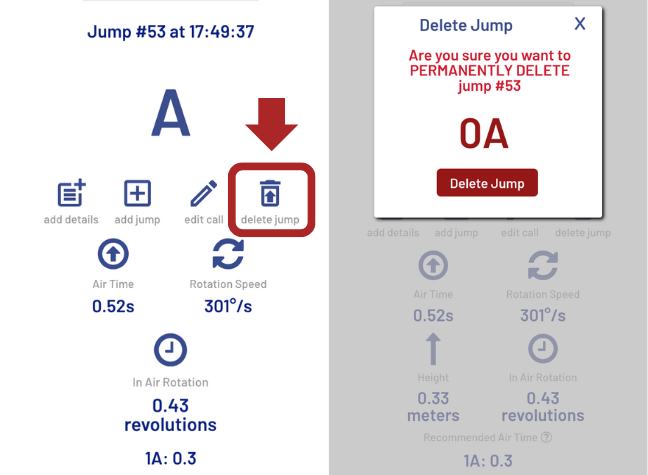
Jump Tracker is very accurate at detecting jumps. Sometimes it can still mistake another movement for a jump. If you do not want this movement in your data, you can delete it in the app.
If Jump Tracker is making a lot of mistakes, check these issues:
I keep seeing A or 1Lo between jumps
Hops and half-jump drills can look like real jumps. If you do not want them in your data, remove them with Delete.
My jump was not detected
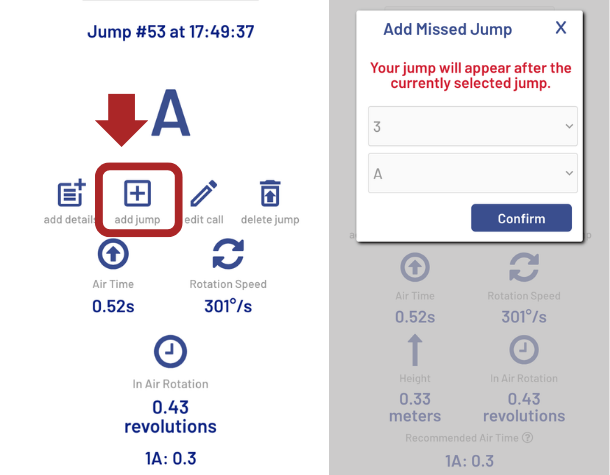
Jump Tracker is very accurate at detecting jumps, but sometimes it can still miss one. You can add a jump to your session using the Add Jump button.
- Confirm sensors are Online during the session.

Jump Tracker is currently optimized for detecting double, triple, and quadruple jumps. We are working on a better version for single-jump detection.
The wrong jump got detected
Jump Tracker has around 91% accuracy on jump classification, but sometimes it makes mistakes. You can edit the call through the app.
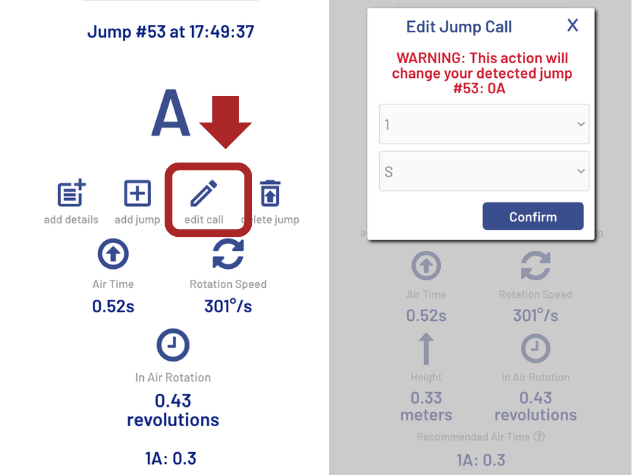
Note: Rotation speed, air time, and in-air rotation remain accurate even if the jump label is wrong.
If Jump Tracker is making a lot of mistakes, check these issues:
My triple was detected as a double
Jump Tracker classifies a jump from your in-air rotation—how much you rotate while you're in the air. It doesn't measure any rotation that happens before takeoff (pre-rotation).
Because of this, Jump Tracker can't always tell apart:
- a clean double with little or no pre-rotation, and
- a downgraded (<<) triple with significant pre-rotation.
This is completely normal while learning a new jump. As you complete more of the rotation in the air, Jump Tracker will start recognizing more of your attempts as triples.
1A detected as 2Eu
This is usually caused by sensor orientation/placement. Check that R is on right foot and L on left foot, both right-side up and visible. Also verify each sensor is in the correct strap with the sensor light visible through the oval window.
Salchow detected as Axel
If your Salchow keeps getting detected as an Axel, move the sensor slightly toward the outside of the boot. This helps Jump Tracker better read your take-off pattern.
Axel detected as Salchow
If your Axel keeps getting detected as a Salchow, move the sensor slightly toward the inside of the boot. This helps Jump Tracker better distinguish the take-off direction.
My jumps are detected as NLJ
NLJ means "non-listed jump" and is used for jumps that Jump Tracker is not able to classify. If it happens a lot, it is generally caused by the left and right sensors being on the wrong side. Check that R is on the right foot and L is on the left foot, both right-side up and visible. Also verify each sensor is in the correct strap, with the sensor light visible through the oval window.
Managing subscriptions
Find my subscription
Under Manage my subscriptions, you should see your Jump Tracker plan.
I bought the subscription but don't see it
Check your order confirmation email — it contains a link to add the subscription to your Aiving account.
Still stuck? Contact us: WhatsApp or [email protected].
Give a skater app access
Log in to the account that bought the subscription.
Assign the skater (this can also be you).
Check my subscription status
Status is at the top of the subscription block.
Manage → update billing or cancel
Starts after first use, once the first jump is successfully detected.
Buy a new subscription
You can buy a subscription directly in the app, on the Subscriptions page.
You can also buy a subscription from the website Buy page.
Change my payment method
ManageOn the next page, update your payment method, billing and delivery address, or personal information. You can also delete the subscription there.
Change my billing or delivery address
Update your billing or delivery address on the page that opens.
If you change the delivery address, also email [email protected] so we can confirm it — especially if a delivery is coming soon.
Stop my subscription
Delete your subscription on the page that opens.
You won't be reimbursed.
You can keep using it until the end of the current paid period. Then it ends automatically.
Downgrade to another plan
Use the account that holds the subscription.
Current plan is in green — choose your new plan, check the price, then Confirm.
Keep your current plan until the end of the paid period. The new plan starts automatically after that.
Upgrade to another plan
Use the account that holds the subscription.
Current plan is in green — choose your new plan, then check the price change.
Current plan ends now. The new one-year plan starts right away.
You are only charged a prorated amount for unused time on the current plan.
If the new plan includes sensors, the subscription is paused until we deliver them and you successfully detect your first jump.
Sensors & sensor care
How to update your sensors
Updates happen automatically during regular use. After an update is released, your sensors download it during the next session and install it the next time they are turned on. This means they will normally be updated by your second session.
Want to update your sensors before your next session? Follow the steps below.
-
Turn on your phone hotspot
Turn on the hotspot your sensors already know, with internet access and Compatibility Mode enabled.
📖 Need help? Phone Hotspot Guide -
Turn on both sensors
📖 Need help? Sensor Management Guide -
Wait until both sensors blink green
Leave them on for 3 minutes.
Not blinking green?
Before you continue, quickly check:
- The hotspot is on, has internet, and Compatibility Mode is enabled.
- This is a hotspot your sensors have connected to before.
- Both sensors stayed on for the full 3 minutes.
Still not blinking green? Open the guide below:
📖 Sensors Offline in AppIf the lights never turn green, contact us: WhatsApp or [email protected].
-
Turn both sensors off
Press and hold until the light turns pink.
-
Turn them back on
The sensors will blink yellow while installing the update. ●
If a sensor doesn't turn on, hold the power button for 15 seconds, then hold it again until a light comes on.
Sensor not blinking yellow?
If no update is available, the sensors will not blink yellow — that is expected, and you can stop here.
If an update is available: repeat from step 2, confirm the light is blinking green, and leave the sensor on for the full 3 minutes after it turns green. Then turn it off and on again.
After a second full attempt with confirmed green for 3 minutes and still no yellow install blink, contact us: WhatsApp or [email protected].
-
You're done!
When the light returns to white or green, your sensors are updated and ready to go.
Battery
Turning on/off and charging details are in Usage Step 1.
Battery life: about 1 hour on ice.
Charging time: 5 hours from empty to full
Battery status in the app
Sensor issues
What is wrong with the sensor?
Choose the issue that best matches what you see.
Sensor does not turn on
- Hold the power button for 15 seconds, then hold it again until a light comes on.
- Still no light? Connect the sensors to the provided charger, then hold the power button until a light comes on.
- Still no light? Make sure the power outlet works by testing it with another device, then reconnect the charger and repeat step 2.
What happens now?
Sensor does not charge
- Hold the power button for 15 seconds, then hold it again until a light comes on.
- Connect the sensors to the provided charger.
- Make sure the sensor is on. If needed, hold the power button until a light comes on.
- Check that the dark blue light is blinking or solid.
- Turn the sensor off normally by holding the power button until the light blinks pink, then stops.
Charge for 5 hours
Leave the sensor connected to the provided charger for 5 hours.
Check the battery level
- Disconnect the sensor from the charger.
- Press the power button once and count the fast blue blinks. If nothing happens, press it once more.
How many fast blue blinks do you see?
Success!
The battery is charging normally and has enough charge.
Let's get you help
Message us and we'll help. We've filled in what you told us during this check — you can edit anything before you send.
What we'll send with your message
What do the different sensor light colors mean?
Connectivity
- ● White (or slightly pink) - No known network in range
- ● Cyan - Known network in range but no internet (or still connecting)
- ● Green blinking - Connected, ready to use
Battery
- ● Red blinking - low battery
- Plugged in:
- ● Blue blinking - charging
- ● Blue solid - fully charged
- Press the button once when the sensor is on to check battery level:
- ● 4 blinks - 75-100% charged
- ● 3 blinks - 50-75% charged
- ● 2 blinks - 25-50% charged
- ● 1 blink - 0-25% charged
Updating
- ● Yellow blinking - this only takes 30 seconds; then the tracker works as normal, so just ignore it and use the sensors as usual.
Configuration mode
- ● Pulsing (any color) — Configuration Mode active
Sensor care
- Store sensors in a dry place.
- Never leave sensors with a fully drained battery for too long.
Strap care
- Check strap closure and positioning regularly before use.
- Keep straps clean and dry after sessions.
- You can wash the straps when needed.
Remember: take the sensors out of the straps before washing.
Connectivity
How to check the connectivity
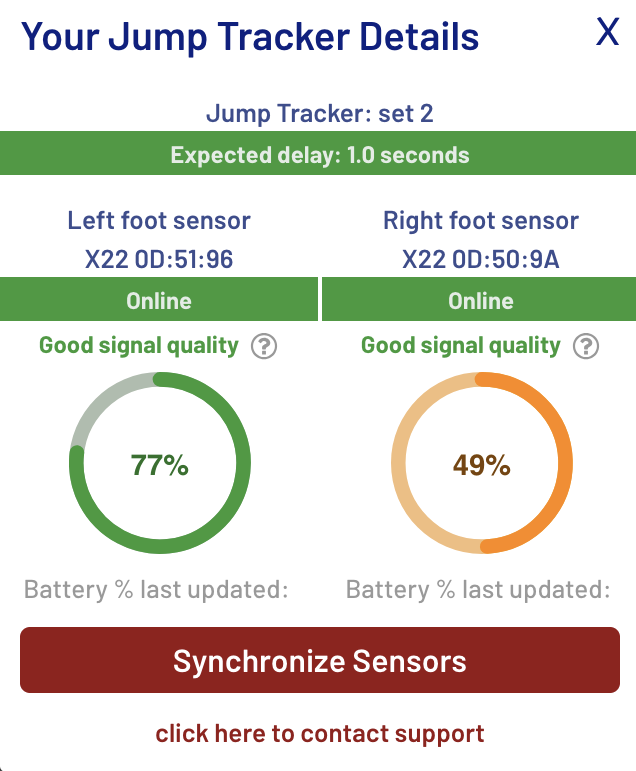
During a session, click the Details button to view the connectivity details.
The Details page shows the expected jump delay, the Left and Right foot sensor connectivity status and signal quality, as well as each sensor's battery status.
Turn on mobile hotspot
📱 iPhone Instructions:
- Open Settings → Personal Hotspot
- Turn ON: "Allow Others to Join"
- Turn ON: "Maximize Compatibility" (Important!)
- Note your Wi-Fi password — you'll need it for configuring
🤖 Android Instructions:
- Open Settings → Hotspot & tethering → Wi-Fi hotspot
- Turn on "Wi-Fi hotspot"
- Set AP Band to 2.4 GHz for maximum compatibility
- Note your network name and password — you'll need them for configuring
Connect Jump Tracker directly to rink Wi-Fi BETA
Use rink Wi-Fi when your phone hotspot or mobile data is unreliable. Once configured, your sensor connects automatically whenever that network is in range.
Sensor requirement: Your Jump Tracker must be fully updated.
Network requirement: The Wi-Fi must not require a login webpage.
Set up rink Wi-Fi
At the rink, with no other known network available, complete the sensor setup.
Configure sensors● You're done when both sensor lights are green.
Connection issue? See connectivity troubleshooting.
How does Jump Tracker connectivity work?
Jump Tracker sends data through your phone hotspot to our cloud for processing. Detected jumps are then securely sent back to your web app.
Aiving Connected Rink BETA
An Aiving Connected Rink is a dedicated Wi-Fi network that lets fully updated Aiving Jump Trackers connect automatically at the rink. Skaters and coaches can use Jump Tracker without relying on a phone hotspot.
How it works
An Aiving Connected Rink consists of a dedicated router connected to the rink's internet connection and configured with a Network Name (SSID) and password provided by Aiving. The router can be installed permanently or brought to the rink whenever it is needed.
Applying to become an Aiving Connected Rink is free of charge.
Costs and responsibilities
The organization (rink, club, coach, etc.) that sets up the Aiving Connected Rink is responsible for managing it. Budget approximately $60 for the router, plus any installation costs. Depending on the rink setup and available IT support, installation can cost anywhere from $0 to several hundred dollars.
Setup is straightforward for someone with basic IT knowledge. If your organization has someone with IT experience, they may be able to complete the setup without additional cost.
How to know if connectivity is good in the app?
Open the Aiving app and check the sensor status.
- Sensors show Online status.
- Data appears with low delay during session.
- Signal quality indicators remain stable.
Sensors Offline in App
First, a quick check
Answer a few quick questions and we'll guide you to the right fix.
Have you ever seen both sensor lights turn green or cyan?
Finish setup first
Your sensors have not been fully set up yet.
Complete the full process of configuring your sensors. Continue until both sensor lights turn green or cyan. If you run into any issues, contact us and we'll help.
Prepare the hotspot and sensors
- Turn on a phone hotspot your sensors have connected to before. Need help turning on your hotspot? ↗
- Turn on both sensors, then wait about 15 seconds. Need help turning on your sensors? ↗
What light do you see?
Look at the sensor light after powering it on, then choose the closest match.
Dark blue — the sensor is charging
- Disconnect the sensor from the charging cable and wait for the light color to change.
- If the light turns red, the battery is very low. Charge the sensor for about one hour, then disconnect it and return to this check.
Still red after charging for one hour? Go to Sensor issues.
Blinking red — the battery is very low
The red blink is a low-battery warning. The color underneath still shows the connection status.
- Charge the sensor for about one hour.
- Disconnect it from the charging cable and return to the light check.
Still blinking red after charging for one hour? Go to Sensor issues.
No light
- Hold the power button for 15 seconds, then hold it again until a light comes on.
- Still no light? Connect the sensors to the provided charger, then hold the power button until a light comes on.
- Still no light? Make sure the power outlet works by testing it with another device, then reconnect the charger and repeat step 2.
What happens now?
Check the battery
Press the power button once and count the fast blue blinks. If nothing happens, press it once more.
Unplug the sensor
The battery has enough charge. Unplug the sensor from the charger, then check the light color again.
Charge the battery
The battery is almost empty.
Charge the sensor for about one hour before continuing this guide.
White light — sensor can't find the hotspot
- Turn the hotspot off and back on.
- Turn the sensor off and back on.
- Make sure the hotspot is visible from another device (tablet, computer, or another phone).
- Confirm compatibility mode is on: Maximize Compatibility (iPhone) or 2.4 GHz (Android).
What color appears now?
Still white
- Hold the sensor power button for 15 seconds, then hold it again until a light comes on.
- Restart the hotspot once more.
Cyan — hotspot found, but no internet
The sensor found the hotspot but there's no internet connection.
- iPhone: make sure mobile data is enabled.
- Android: make sure the phone has internet through mobile data or Wi-Fi.
Green — the sensor is online
- Start a session in the Jump Tracker app.
- Wait until the sensors finish synchronizing.
What does the app show?
Is the sensor light still green?
Check the selected sensor IDs
- In the Jump Tracker app, click Details.
- Compare the serial number shown for each sensor with the number printed on that sensor. Ignore any colons (:) shown in the app.
Do both sensor IDs match?
Select the matching sensor set
Return to sensor selection and choose the set whose serial numbers match those printed on your sensors.
Check the connection status
During the session, what color is the connection status in the app?
Improve the connection
Your internet connection isn't strong or stable enough.
- Disable Battery Saving or Low Power Mode on your phone.
- Keep the phone close to the sensors throughout the session — hotspot range varies a lot between devices.
- Try another phone with a stronger hotspot (Jump Tracker is tested most with Android hotspots).
- If available, connect the sensors directly to your rink's Wi-Fi ↗ instead of a hotspot.
- For a permanent, reliable connection, ask your rink about an Aiving Connected Rink ↗.
Success!
Your connection is stable. If the sensors stay online and green throughout your session, the issue is resolved. Enjoy your session!
Let's get you help
Message us and we'll get you connected. We've filled in what you told us during this check — you can edit anything before you send.
What we'll send with your message
One last thing — when does this happen?
Beta features
Beta features are ready to try, but still being refined. You may occasionally encounter bugs or accuracy issues.
Explore current beta features
Report a beta issue or accuracy concern
Send us a short description by email or WhatsApp. WhatsApp is especially convenient for videos.
When possible, include a screenshot or video, what happened, and how you assessed it. Reports without supporting evidence are useful too.